
Are you fascinated by the logos, explainer videos and Instagram Reels you see around you? There’s an art to making logos come alive and the skill behind them is called motion graphics. It is one of the fastest growing skills in the digital world and you can master it now.
Whether you wish to make a career as an animator, freelancer or just improve your business’s videos there are some animation tips for beginners that all motion graphics artists should know. We’ll also discuss how a motion graphics course in Kottakkal can support your journey.
What Are Motion Graphics?
Motion graphics is an art of motion graphics animation. Contrary to the traditional animation, which employs characters to convey the message, motion graphics focuses on information and utilizes text, icons, illustrations, graphics, and symbols to deliver the information.
You can find motion graphics almost anywhere:
Logo animations at the beginning of YouTube clips
Product and service explainer videos
TV and movie titles and lower thirds
Social media advertisements and Reels
App interfaces and website animations
Infographics and data visualization
Businesses are now looking to hire motion designers more than ever before.
Why Learn Motion Graphics in 2026?
The most consumed content on the Internet is video content. To capture the viewer’s attention, brands are now looking to use short animated videos. This has created numerous opportunities for motion designers.
High demand: Advertising agencies, production houses, startups and media companies all need motion graphics designers
Freelance opportunities: You can bid for international projects right from your home
Creative expression: There is scope for combining creativity, design, music, narrative, and technology
Career growth: You have an opportunity to grow from a motion graphics designer to a video editor or VFX artist
Easy to learn: All you need is a good computer and the right guidance
Essential Animation Tips for Beginners

1. Know the 12 principles of animation
All great animators understand the 12 principles of animation. Some of these principles are more important than others for motion graphics:
Timing and spacing: This gives objects their weight and speed
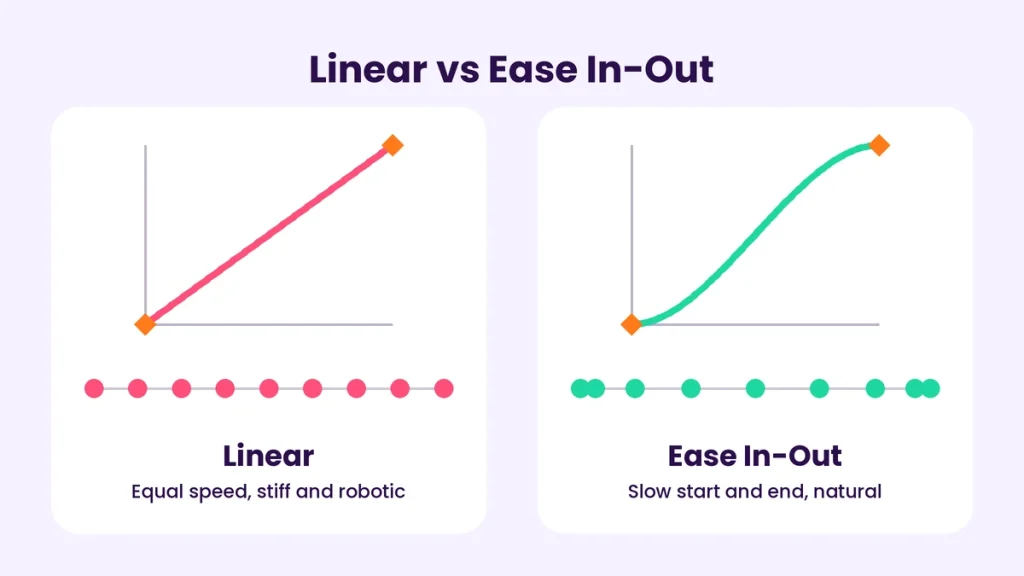
Ease in and out: Acceleration and deceleration should feel natural and not linear
Anticipation: A movement in the opposite direction of an action to suggest what will happen next
Follow-through and overlapping action: The different parts of a body or object will react to action at different times
Squash and stretch: Distortion that adds fullness and softness to objects
These tricks will make the difference between a stiff and a realistic motion graphic.
2. Learn the necessary graphic designing software
There are many graphic designing software in the market. As a motion graphics designer, you need to know:
Adobe After Effects: The most common design software used in the motion graphics industry
Adobe Illustrator and Photoshop: For graphic/image creation and manipulation
Adobe Premiere or DaVinci Resolve: For final video editing
Cinema 4D or Blender: For 3D animation and special effects
You should focus first on learning Adobe After Effects and then move onto other applications. After learning the basics of animation, you can add effects with the other programs.
3. Understand keyframes and the graph editor
Keyframes define specific values for an object at a given time. The software then calculates the motion between two consecutive keyframes. Although many beginner animators only use keyframes, more advanced motion graphics require the Graph Editor to fine-tune an animation and make it look professional.
4. Keep it simple
Beginner motion graphics animators tend to overdo their designs. This makes them look cluttered and unprofessional. A few general rules to keep in mind while designing are:
Use 3-4 colors
Use no more than 2 fonts
Make sure to animate only what is necessary
Leave space between elements
5. Learn typography animation
Text animation or kinetic typography is a key skill for motion graphics design.
When animating text:
Use readable fonts
Don’t make them appear or disappear too quickly
Make sure to animate words or letters and not the whole text at once
Make the contrast between text and background high for readability
Try animating your favorite quote as an exercise.
6. Storyboard and plan before animating
Professional motion graphics designers do not just open After Effects and start animating. They first develop a script, storyboard and style frames:
Script: What you want to say
Storyboard: What you want to see on screen
Style frames: Final designs of a few chosen storyboards
Animatic: Rough version of the storyboard in video form
Only then do they start animating. Storyboarding saves a lot of time that would be wasted changing elements midway through a project.
7. Sound design
Sound effects can make an animation look more realistic and add to the overall effect. You can synchronize animation to the rhythm of the music and add subtle effects for clicks, whooshes and other sounds.
8. Learn shortcuts and maintain a clean project
There are many keyboard shortcuts in After Effects that make software navigation easier. Other ways to make your work process easier are:
Naming your layers clearly
Using colors to sort your project layers
Pre-composing complex designs
Keeping digital folders organized
If your project looks too cluttered, clients may not take you seriously.
9. Study and recreate great works of others
Watch a lot of motion graphics design videos and pay attention to:
How they time their scene changes
What makes their animation look good
What color palettes and typography they use
Try recreating some of your favorite animations. It’s a great way to learn.
10. Practice and build a strong portfolio
It is important to practice motion graphics at least once a week. You can try animating a logo, icons or text for 30 seconds. In a few months, you will have a great portfolio that will help you get clients and job offers. It is always better to have 5 great projects than 20 poor ones.
Common Mistakes To Avoid As A Beginner Motion Graphics Designer
Incorrect use of easing
Too many effects Poor composition and layer arrangement
Not rendering the animation before submission
Skipping the basics to learn advanced software
Not seeking feedback
Why Join a Motion Graphic Course in Kottakkal?
Although there are various free resources online, a motion graphics course in Kottakkal will help you learn the skill in the best way possible.
Some of the best things about a motion graphic course are:
Structured learning: Courses follow a certain methodology so you know exactly what you need to learn
Project-based training: Motion graphics is a practical skill and the best way to learn it is by creating projects such as logo animation, explainer videos, social media posts, title sequences, and more
Mentorship: You also get the benefit of having a mentor who can guide you throughout your motion graphics design career
Access to tools: You will be able to work with the design tools needed for your motion graphics projects
Portfolio and career support: Courses will also help you build a strong portfolio, prepare for interviews, and help you explore the possibility of a freelancing career
Learning the fundamentals near home is always the best option, especially if you’re a student in and around the Malappuram district. A local motion graphics course in Kottakkal will save you from the hassle of traveling.
What To Look For In A Motion Graphic Course
Curriculum
Whether the trainer is a professional
Whether the course includes project creation for building a portfolio
Batch size
Flexibility for students, professionals and beginners
The value of certification and placement support
Reviews and the quality of work done by the students in the program
Your Career Prospects After Learning Motion Graphics
As a motion graphics designer, you can work in:
The advertising industry
As a video editor
A 2D animator
An explainer video creator
A social media video designer
A UI/UX animator
A VFX compositor
As a freelancer on global job boards
With time, you can grow from a motion graphics designer to a 3D animator, creative director or open your own design studio.
A Simple 30 Day Plan For Motion Graphics Designers
Week 1: Learn After Effects fundamentals such as the interface, layers, and keyframes
Week 2: Practice using shape layers, keyframe animations and Graph Editor
Week 3: Learn how to animate text and create logo reveal animations
Week 4: Make a project combining everything you’ve learned and add background music
At the end of the month, you should be able to create a short animation. With the right motion graphic course in Kottakkal, you can move to more advanced skills.
Final Thoughts
Motion graphics is a fascinating skill that will always be in demand. The core concepts of motion graphics animation are fairly simple to learn and the best part is that anyone can learn them. By knowing the important animation principles, practicing and using the right graphic designing and video editing software, you too can create amazing motion graphics designs.
If you’re serious about taking up motion graphics as a profession, the right motion graphics course in kottakkal will provide you with the necessary guidance and project experience to build a great portfolio.